Category Archives: JISC

Project Sunflower: Usability Study

As part of our eBook usability study, this part deals with studying the devices from the eBook reader point of view. All three devices,  Apple iPad 2, Amazon Kindle DX and Motorola XOOM have eBook reading capabilities, with Kindle being a dedicated eBook reader.  The aim of the study was to analyse the ease with which a user can perform a particular task on each device, the user-friendliness of the UI and the eBook reading experience the device has to offer. Two studies were devised for the purpose of our research. One study aims at understanding the user experience the devices have to offer in general, and the second study aims at understanding the eBook reading experience.

Internet access was enabled for all devices for the purpose of the study, as connecting to the internet is not part of the eBook reading activity.

Study 1

The study was implemented in two phases, the difference being the instructions given to the user.

Phase 1

In this phase, the devices were connected to the internet, and the users were asked to download and open an eBook on the respective device. They were not told about specific apps that were needed to render eBooks, and were given no specifics whatsoever. The users were not given any instructions so as to get a firsthand view of where they try to get the eBooks from, whether they even know about the requirement of specific apps to render eBooks on the devices and of any other OS specific functions.

This study helped evaluate whether prior experience with the OS played a significant role in understanding OS specific requirements such as apps, the app stores the devices used, and the place to get eBooks from.

Phase 2

In this phase, the users were given more specific instructions about the applications that they would have to download to be able to read eBooks in the ePub format. This test helped answer questions such as, did the user know where to get the application, which application to get, did they have trouble installing the application, how to download eBooks on the device, and so on.

This study gave a very clear understanding about the intuitiveness of the UI, the difficulty or ease in performing tasks, and whether previous experience with either similar devices or the operating system played a part in performing the given task.

Study 2

This study was devised to evaluate the eBook reading experience each of the devices had to offer. The participants of the study gave feedback on the overall device design from point of view of an eBook reader, the user-friendliness of the user interface from the eBook reading point of view, and inputs on the in-book settings the devices allowed the users to change.

In this study, the users were asked to inspect two areas of the eBook reader or eBook reading app. First, the overall readability of eBooks was tested by asking the users to read a book for ten minutes on the device. The eBooks were rendered at default settings. This part of the test was to get feedback on the eBook reading experience the device offers. For the next part of the test, the users were asked to find and change the settings they wished to change when reading, and also inspect the settings the device offered. For this part of the study, each user was given five minutes. This dedicated time to change settings allowed the users to find all or most settings the software offered, and identify settings the software lacks or are unnecessary.

Cc image by Astragony

Project Sunflower: Time to Launch Application, Open a Book and Flip Page

Well, we now have results regarding the time taken for the Apple iPad 2, Amazon Kindle DX and Motorola XOOM to render eBooks. We installed iBooks on iPad and the Kindle App for Android on XOOM. The Google Books app can’t be installed (yet) in UK due to copyright issues. We recorded the time taken by the devices to open the app, open a book, and flip a page.

Since there is no emulator that performs exactly like the physical device, we chose to take a practical approach to measure the times. The render times were measured in two ways. One, manually, and the other using a video camera.

Manual Method

Take a stopwatch in one hand, and have the other hand tap on the device. For example, when using an iPad, what we did was to hold the stopwatch in the left hand, and tap the iPad with the right hand. Start the stopwatch precisely when the iPad is tapped, and stop when the desired action is done. This method depends a lot on the user’s reflexes and you may have your doubts about the level of precision when it comes to results. Let me tell you, the results were surprisingly accurate. Read the figures to see for yourself.

Camera Method

This is a slightly more sophisticated way of measuring, though just as simple. All you need to know is the fps (frames per second) at which the video is recorded, and a video player that can replay the video frame-per-frame. Record the desired action on-camera, and then replay the video frame-per-frame. The number of frames traversed from the start to end of the task gives a more precise time taken to complete the task than the manual method.

Results

We measured the times for six free eBooks per device. Six readings were taken per task, and the average time for each task was calculated.

iPad (Average from six readings)


Kindle DX (Average from six readings)

There is no application load time as all the books are displayed directly on the Homescreen.

XOOM (Average from six readings)


Both the methods gave fairly similar results. The differences in the times on an average are:

The standard deviations for each method are shown below:

iPad (Standard Deviation)


Kindle DX (Standard Deviation)


XOOM (Standard Deviation)


The standard deviation tables show that the camera method showed less variation from the average as compared to the manual method in all but two cases, where the difference is only 1/100th of a second. These two cases may be safely ignored.

Although both methods gave fairly similar results, it must be noted that the manual method would give varied results for every test. It is completely dependent upon user reflexes, and slow reflexes could have seriously bad results. The camera method does take up more time, however the results are more accurate and dependable  So, I’d recommend the camera method.

All the recorded times are an average, and the times may change with the length of the books proportionally. These results give us a fair idea about the various devices when it comes to render speed and page flipping. The iPad and XOOM clearly render faster than Kindle DX. However, these results are only pertaining to the device capabilities and say nothing about the user experience. What makes an eBook reader good or bad does not depend only on the render speeds, but more so on the user experience the device has to offer. A detailed usability study of the devices will be undertaken soon which will shed light on the varied user experience, and help us better understand what the user expects from an eBook reader.

Project Sunflower: Kindle DX, iPad and XOOM (Purchasing and Installing Content, and Integration)

In this article we showcase the ways in which the three devices allow purchase and installation of content, and look at the integration capabilities each device has to offer.

Kindle DX

Purchasing and Installing Content

  • Content for the Kindle can be downloaded on a PC/Mac from the Amazon web-site and transferred to the device by USB.
  • Content can be purchased and downloaded on the Kindle itself  (Wi-Fi or 3G required).

Integration

  • Kindle apps are available for iOS devices as well as Android devices
  • Kindle purchases are transferable to other Kindle devices

iPad

Purchasing and Installing Content

  • Purchase and downloading of content on a PC/Mac requires iTunes to be installed. Content can be transferred through USB.
  • Content can be purchased and downloaded on the iOS device from the iBooks app available in the App Store.

Integration

  • Books purchased in iBooks cannot be read on eBook readers running on platforms other than iOS
  • Other devices can read books purchased from the Kindle App

Motorola Xoom

Purchasing and Installing Content

  • Free ebooks can be downloaded from Google Books on the desktop and on the device
  • Google Books provides links to purchase books from other booksellers
  • Content can be transferred to the device through USB

Integration

  • Books purchased can be read on other Android devices
  • Books purchased can be read on iOS devices that have the Google Books app installed
  • Google Book is also compatible with any browser with JavaScript enabled

Project Sunflower: The Unboxing Experience

The devices (Amazon Kindle DX, Apple iPad and Motorola XOOM) we ordered a few weeks back finally arrived yesterday. Here’s how it went.

Kindle DX

Amazon has made great use of the Kindle’s E Ink display, with instructions displayed on the screen, waiting to be read once the Kindle is unboxed. The display showed where the power button was, asking to slide and release, and also to plug in the Kindle to a power source. On starting, the Kindle was already setup to the Amazon account it was registered with and displayed a user’s guide. Very simple.

iPad

Setting up the iPad was a bit tedious. On switching on the device, it immediately showed the iTunes USB screen that indicated connecting the iPad to a PC/Mac for setup. The iPad does not start unless connected to a PC/Mac that has iTunes installed. Since I did not have a desktop with iTunes installed, it took some time to install iTunes just to setup the iPad and get the iPad to work. Once this was done, the on-screen instructions took care of the rest. This issue will be solved in the next iOS update allowing wireless setup of iOS devices, but presently its not supported.

XOOM

The XOOM looked different from the other two devices, as its primary orientation is landscape and not portrait. The iPad and Kindle have the Power/Sleep button on the edge of the device. Expecting the same, I checked its edges for the power button. To my surprise, it was not to be found. After checking all sides and mistaking the SIM card slot for the power button, I decided to resort to the documentation. This was the first time I had to check documentation given with the device to find the power button. Its a concave button, placed very close to the camera, which is hardly visible in low lighting conditions. However, it was only a first time thing, after which it made sense as to why the button is placed where it is. Its very convenient and easy to reach when holding the device in landscape mode, as your finger naturally rests very close to the button.

Now, since the wait is done and the devices are finally here, we can start working with them.

Project Sunflower: Devices for Research

There are a large number of eReaders currently available in the market. We have chosen three devices, one with an E Ink display and the other two with LED displays, each running on a different operating system. Amazon Kindle DX, Apple iPad 2 and Motorola Xoom are three devices we will be using. The Kindle DX runs on Linux, iPad on iOS and the Motorola Xoom on Android 3.0.


Amazon Kindle being a dedicated eBook reader has capability to read eBooks by default, without requiring the installation of an eBook application. iPad and Xoom being tablet PCs primarily, require an additional application to be installed that allows the device to render eBooks. We will be considering the native applications that are developed specifically for the device.

Apple iPad

iBooks is the default application for reading eBooks on the iPad. It is free to download from the Apple App Store, and allows in-app purchases. The iBookstore has over 200,000 eBooks available for purchase, with some free ones. There are other eBook apps too, such as the Kindle app and many more.

Motorola Xoom

Google Books is the default application for reading eBooks on Android devices. However, due to publisher restrictions, Google Books is not available to users in UK (yet). The Kindle app for Android works just fine, though you need to have an Amazon account. The other eBook apps rated highly in the Android Market (Android’s App Store) are mostly paid.

Amazon Kindle DX

The Kindle is a dedicated eBook reader. Books are directly displayed on the homescreen, where you can start reading immediately. You can purchase books from the Kindle Store. Most of the books also have a free sample that Amazon wirelessly transfers to the device, allowing you to read the beginning of the book and then decide whether to buy it or not.

Project Sunflower

Project Sunflower aims to perform hardware landscaping on various eBook readers currently available in the market. The aim is to understand various factors that affect and influence the rendering of the ePub format on the different eBook readers. The studies conducted during the course of the project will help us better understand the current situation of the eBook reader capabilities in terms of the ePub format and also give insight into probable recommendations, if any that may help us enhance the usability and effectiveness of the eBook readers as well as the eBook medium as a whole.

Approach

The project is divided into three areas of work in order to realise the main objective:

  • Documentation of installation, usage and software integration for each of the chosen candidate systems.
  • The activities to be performed during this phase are review and analysis of factors such as:
    • Software features of each device through practical testing to help evaluate usability and ‘learnability’ of the device features.
    • User impression of device speed and responsiveness
    • User reading speed on each device
    • User satisfaction with the device
    • Impact of choice of platform on user recall of the information read
  • Evaluate device ergonomics

Final Outcome

The final results obtained from the study will be put together into a comprehensive document with findings and suitable recommendations in the form of a usabillity study report.
As a secondary result, we will also be detailing the methodology used in order to conduct each study (for example, method used to monitor muscoskeletal stresses).

A Brief Introduction to eBooks and eReading

eBooks have been around for almost 4 decades now. The earliest eBooks were those in Project Gutenberg, the oldest digital library, founded in 1971.  eBooks and eReaders have gained a lot of popularity in the last decade or so. A large of people are increasingly moving towards eBooks to satisfy their literary needs.

eBooks

For those who have heard of eBooks but don’t really know what they are, an eBook stands for electronic book. These eBooks can be read on computers or other electronic devices. For starters, if I were to ask how would you carry your favourite books, each around 1000 pages on an international flight which you may or may not want to read again, what would you do? Yes, you do have to carry your clothes and other essentials too. In such a case, chances are, you’ll leave the books at home. eBooks were created to solve this exact problem. eBooks are mainly for portability and providing convenient and fast access to books, with newer devices supporting news, magazines and internet surfing. eBooks come with various memory options ranging from limited internal memory allowing you to store around 200 books to ones with an expandable memory of up to 64GB allowing you to store as many as 50,000 eBooks. A huge number of eBooks are currently sold by publishers all over the world.

Some of the oldest written scripts (Cuneiform script) date back to the 30th century B.C. Our ancestors drew paintings and symbols on clay and stone for very many years. We then evolved from writing on clay to writing on papyrus (made from the pith of the Papyrus plant) and other materials, eventually coming to the invention of paper which was superseded by digital information. We have come a long way from reading pictures and writings off stone and clay that can last for ages, to reading books, magazines and novels on small hand-held devices that can be erased by the touch of a button, but if not can stay for just as long. These handheld devices are capable of automatically updating news and other necessary information within a few seconds of the information becoming available.

eBook Readers

There are a large number of eBook readers currently available in the market. These eBook readers differ from each other in a number of ways such as the underlying operating system, hardware capabilities, available screen real estate, display technology and others. These eBook readers are capable of rendering different types of eBook formats; ePub, PDF, mobi, txt and azw being some of the most widely used. Due to the large number of eBook readers available, deciding which one to go for is not an easy task. Especially when some of them cost around £500. Making an informed decision by reviewing each and every device can take hours on end, seldom giving fruitful results and making it a matter of personal preference. All the devices have rights and wrongs, pros and cons, winning features and well, some not-so-good features.

ePub Format

The ePub format has gained popularity among eBook makers as it is designed for re-flowable (content presentation adapts to the output device) and re-sizable content . A large number of readers are capable of rendering the ePub format in a variety of form factors. These include traditional PCs and laptops, tablet PCs, Android and iPad devices, eInk devices in several configurations ranging from ‘paperback-size’ to A4-equivalent, mobile telephones and MP3 players, and so forth.

CC Image by Rodrigo Galindez

Extended Repository PDF Assessment

As part of FixRep a small project is being carried out to examine the use of metadata in pdf documents held in HE/FE repositories (such as the University of Bath’s Opus repository). This builds on an initial pilot that was carried out using pdfs harvested from Opus, which we wrote a paper about for QQML 2010 (Hewson & Tonkin, 2010).

The original study of Opus was an exploration to test out the extraction and analysis process. Obviously the initial analysis focusing on only one repository could only be used to draw conclusions about what’s in Opus; issues it may present, metadata usage, etc. The extended assessment is examining pdfs from about a dozen UK repositories so that a reasonable analysis of metadata, comparison of ‘standard’ usage, and common vs. unique issues, can be obtained.

So, how are we going about this?

It’s a pretty manual process at the moment, at least each of the stages is kicked-off manually, and can be divided into three stages…

  • Harvest the pdf files
  • Extract the metadata into database
  • Analyse content

Harvest…

Using wget the repository structure containing the pdf files is copied to a local server. This process takes some time and can be rather heavy-handed in the overhead it places on the repository server through continual requests for files. If we wanted to extend the extraction and analysis process into a service that regularly updates, then a more considerate approach towards the repositories would be required. However, we’ve got away with it at least this far!

Extract & load…

A prototype service that extracts information from pdf documents was developed as part of the FixRep project. It extracts the information in a number of ways:

Heading and formatting analysis, such as:

  • The version of the PDF standard in use
  • Whether certain features, such as PDF tagging, are declared to be in use
  • The software used to create the PDF
  • The publisher of the PDF
  • The date of creation and last modification

Information about the body of the documents:

  • Whether images or text could be successfully extracted from the document and, if they could, information about those data objects.
  • If any text could be extracted from the object, further information such as the language in which it appeared to be written and the number of words in the text

Information from the originating filesystem, such as:

  • document path
  • document size
  • creation date, etc.

The extracted information is put into intermediate files in an XML format and is then loaded into a MySQL database for…

Analysis…

PDF Processing

PDF Processing

The first thing we actually look at is how many of the harvested pdf files could be processed, and for those that failed, what was the reason they failed. For example in out pilot run against the Opus content about 80% of pdf files could be processed. The 20% that failed were mainly due to the service being unable to extract meaningful information, while a very small number of files turned out to be ‘bad’ pdfs – that is the format of the files was corrupted or not in a recognisable file format. some of the errors identified were recoverable with some manual intervention, while some meant file had to be excluded as un-processable.

While not definitive, this does give us a baseline expectation for the success rate of extracting meaningful information from other repositories.

Once we have the data in the database it’s easy enough to run some sql to generate simple statistics such as: Type and number of distinct metadata tags used;  Average number of metadata tags per file; etc. This gives us a good overview of the content (in a given repository) and whether the content is consistent within and between repositories.

Next steps…

The target repositories have been harvested and will soon be processed for analysis. So, unless some very unexpected processing problems happen we should have results and be ready to produce a report on this project in early December.

writeslike.us: identity information from repository metadata

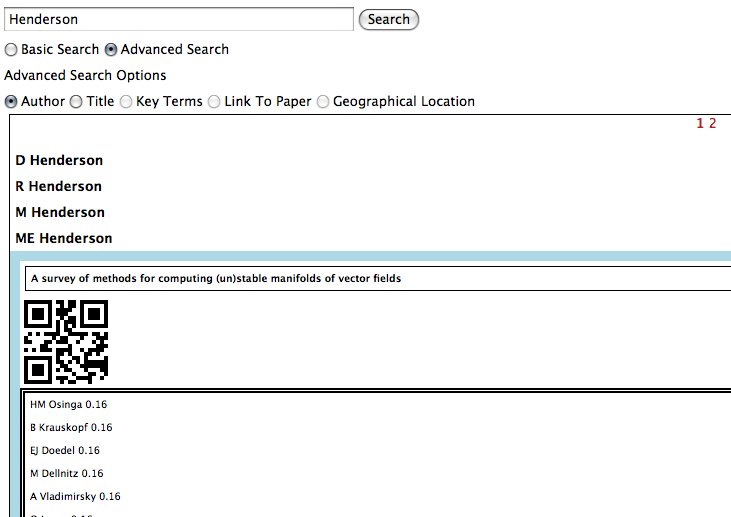
  • Screenshots or diagram of prototype:
    Writeslike.us search
    Searching for a person
    Writeslike.us search
    Choosing an individual
    Writeslike.us search
    Viewing information about them and people who ‘write like them’
  • Description of Prototype: Explore people, publications, institutions and themes through oai metadata
  • End User of Prototype: “Jonathan is a researcher in evolutionary linguistics. He has become very interested in possible mathematical mechanisms for describing the nature, growth and adaption of language, as he has heard that others, such as Partha Nyogi, have done some very interesting work in this area. Unfortunately, Jonathan is not a mathematician and finds that some of the detail is hard to follow. He realises that what he really needs to do is either to go to the right sort of event or the right sort of online forum and find some people who might be interested in exploring links between his specialist area and their own. Both of these are difficult in their own ways. To go to the right sort of event would mean identifying what sort of event that would be, and he does not have enough money to go to very many. So he chooses to look up possible events and web forums, thinking that he can look through the participant lists for names that he recognises. This is greatly simplified by a system that uses information about the papers and authors that he considers most relevant; with this information it is able to parse through lists of participants in events or online communities in order to provide him with a rough classification of how relevant the group is likely to be to his ideas.”
  • Link to working prototype: writeslike.us
  • Link to end user documentation: http://www.ukoln.ac.uk/projects/writeslike.us
  • Link to code repository or API: http://code.google.com/p/writeslikeus/
  • Link to technical documentation: http://www.ukoln.ac.uk/projects/writeslike.us (TBA)
  • Date prototype was launched: Dec 01 2009
  • Project Team Names, Emails and Organisations: Emma Tonkin, e.tonkin@ukoln.ac.uk, UKOLN; Alexey Strelnikov, a.strelnikov@ukoln.ac.uk, UKOLN, Andrew Hewson, a.hewson@ukoln.ac.uk, UKOLN
  • Project Website: http://code.google.com/p/writeslikeus/
  • PIMS entry: https://pims.jisc.ac.uk/projects/view/1263
  • Table of Content for Project Posts: TBA

Value Add

Probably the most important thing I discovered in this project was the importance of ‘crowdsourced’ data in filling in the gaps between metadata and common knowledge.

The availability of Wikipedia as a source of random information, although much of it contains inadequate structure to search through with something like dbpedia, is a very important factor for us in improving the metadata and the data that we are putting together to support usage of that metadata. It’s not perfect of course – or perhaps it’s better to say that the imperfect and rough ways in which we use the data are not able to achieve the sorts of results that one might like – but it seems obvious that it’s an invaluable resource for the future.

Other data sources have been invaluable for us as well, particularly DBLP, despite the strong focus on computer science (which, however, means that for training across domains we should probably be looking elsewhere too 🙂 )

Finally, social tags have been less effective for our purposes than one might imagine for one reason, which is that there aren’t an awful lot of them around, and those that are need to be detected by a relatively complex process of resolving title/author into the most popular mirror URI(s).

We’ll be publishing some of the extracted data shortly – boring but useful stuff like lists of institutions, urls, coordinates, enhanced metadata, etc – so hopefully it will come in useful to others!